.webp)
The light won’t turn on

.svg)
We need your serial number
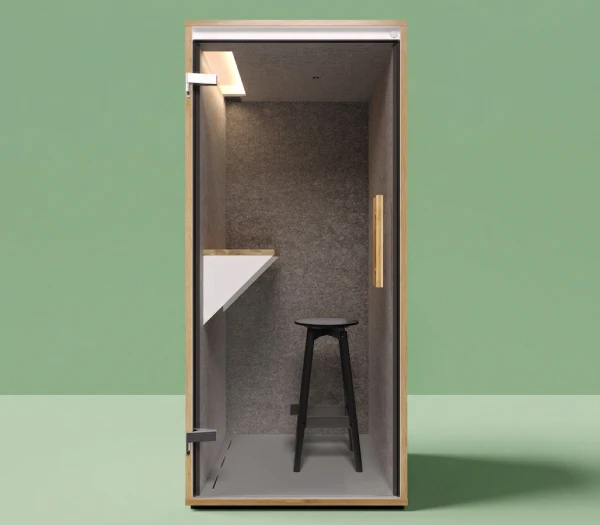
Our phone booths SOLO have changed slightly over the years. That’s why the solutions for this issue vary depending on the generation.
Please enter the serial number of your phone booth below. We’ll then show you how to solve the issue.
You can find the serial number on the door side inside the light slot of the ceiling element. It’s easiest to take a photo with your smartphone, as the number is slightly hidden.
Help for phone booth SOLO - Option 1
The light in your phone booth SOLO should switch on automatically as soon as you enter the booth.
If this no longer happens, please check two things:
- Power
Are you sure the plug is properly connected and the power outlet is working? Please test whether it works when plugging the booth into a different outlet. This is the quickest way to identify the issue. - Sensor
If the issue is not caused by missing power, the problem is usually related to the sensor. In this case, the sensor should be cleaned.
Please follow these steps:
- Locate the sensor
It is located on the ceiling of your booth. Look for a small black plastic component.
- Clean the sensor
Using a microfiber cloth or another suitable cleaning cloth, carefully remove dust and dirt from the sensor.
Were you able to solve the problem? Great.
Does the light still remain off?
Together, we’ll definitely find a solution. Please send us a message here including the serial number(?) of your phone booth and a description of the problem.
We’ll get back to you shortly.
Help for phone booth SOLO - Option 2
The light in your phone booth SOLO should switch on automatically as soon as you enter the booth. If this no longer happens, please check two things:
- Power
Are you sure the plug is properly connected and the power outlet is working? Please test whether it works when plugging the booth into a different outlet. This is the quickest way to identify the issue. - Sensor
If the issue is not caused by missing power, the problem is usually related to the sensor. In this case, the sensor should be cleaned.
Please follow these steps:
- Locate the sensor
It is located on the ceiling of your booth. Look for a small milky-white sphere surrounded by black plastic. - Clean the sensor
You can carefully pull the sensor slightly out and clean it with a microfiber cloth or another suitable cleaning cloth to remove dust and dirt. - If this does not solve the issue, check the switch on the sensor:
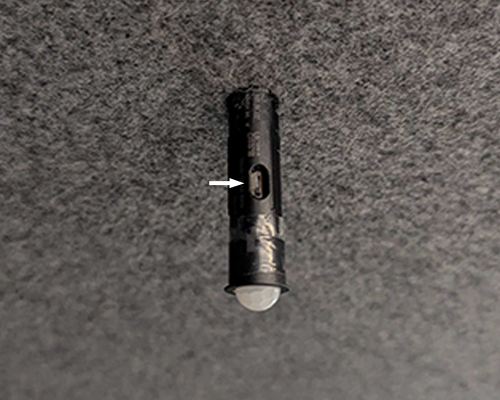
Were you able to solve the problem? Great.
Does the light still remain off?
Together, we’ll definitely find a solution. Please send us a message here including the serial number(?) of your phone booth and a description of the problem.
We’ll get back to you shortly.

.svg)
.svg)
.svg)
Our solutions for your office: